PrestaShop Update & Upgrade
Update version, modules, theme, PHP, and database in a controlled way – with staging, backup, testing, and a rollback plan.
Plan UpdatePrestaShop DEVELOPMENT, MIGRATION & SUPPORT
Waldbyte develops, migrates and supports PrestaShop shops for B2C, B2B and custom e-commerce workflows. From updates and data migration to modules and interfaces through to support, SEO and performance, you receive technical implementation with a personal point of contact.
Prefer to speak directly? Book a free 30-minute introductory call
PrestaShop UPDATE SERVICE
Update version, modules, theme, PHP, and database in a controlled way – with staging, backup, testing, and a rollback plan.
Plan UpdateTransfer products, customers, orders, URLs, and business processes in a structured way and review them before go-live.
Plan MigrationAnalyze errors, plan updates, manage security and backups, and develop the shop further in a transparent way.
View SupportDevelop custom features and integrations with ERP, PIM, CRM, marketplaces, payment, and shipping.
View DevelopmentAnalyze and improve indexing, templates, structured data, loading speed, and conversion paths according to priority.
SEO & PerformanceUpdate path for grown PrestaShop shops
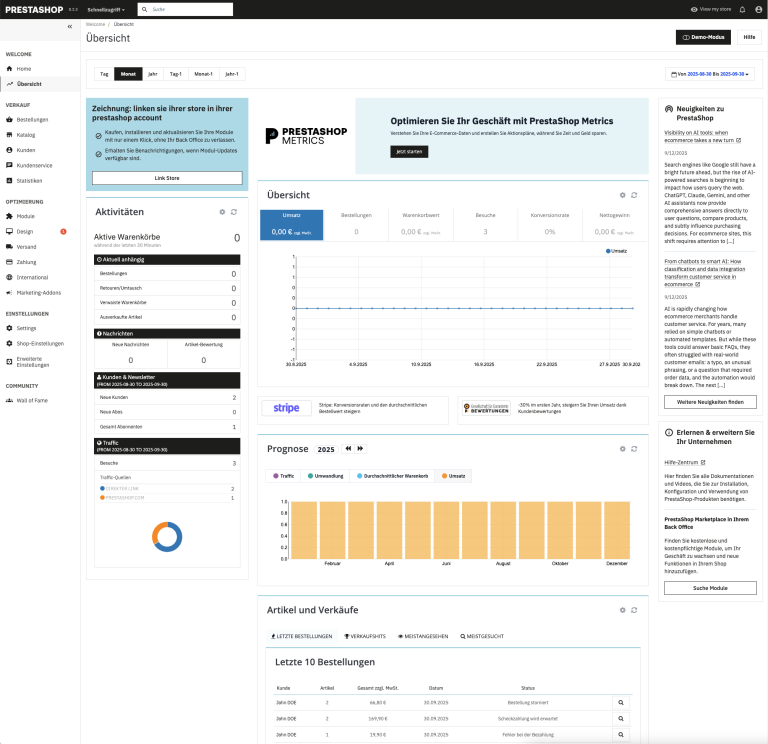
Many shops have been expanded over the years with modules, theme customizations, and old PHP versions. We make it clear which components are blocking an update and which steps are needed for a stable migration.
Select the services you need. Waldbyte will review your details and prepare an individual, non-binding cost estimate.
UPDATE, SECURITY & OPERATIONS
A PrestaShop update affects revenue, checkout, customer data, payment methods, shipping logic, modules and visibility. That is why we plan the change technically before anything is changed in the live shop.
Core, PHP version, database, modules, theme, and overrides are technically assessed before the update.
Updates, upgrades, and migrations are first prepared and tested in a staging environment.
Products, customers, orders, URLs, metadata, and redirects are deliberately planned in.
After the update, we check checkout, modules, performance, error logs, and open customizations.
LIVE DEMO
If you would like to see the system in practice, you can test the frontend and backend directly in a live demo.
For more context, see the indexable PrestaShop 9 Demo page.
Test shop workflows, products, and orders in a real environment.
UPDATE AND MIGRATION PROCESS
We review the PrestaShop version, modules, theme, overrides, PHP, database, interfaces, and known sources of errors.
The shop is backed up, moved into a test environment, and prepared with a realistic update or migration path.
Core, modules, theme, data, checkout, payment methods, shipping, and backend functions are updated and tested.
After the controlled go-live, we check logs, orders, performance, indexing, and any outstanding module or theme adjustments.
Our specialist articles provide deeper insight into decisions that should be clarified before an update or migration.
The Update Assistant guide explains technical requirements, modules, the theme, PHP, and the difference between an update and a migration.
The migration checklist shows how data mapping, test imports, redirects, and follow-up checks work together.
The article on the PrestaShop withdrawal button describes order assignment, confirmation, the backend process, and technical testing. Legal assessment remains the responsibility of qualified legal counsel.
The article AI SEO for TYPO3 and PrestaShop explains how product, category, and search data can work together in a controlled process.
See how brand experience, product presentation, checkout, seven custom modules and ongoing technical operations work together in a German online shop in the Ballonswelt PrestaShop case study.
PrestaShop is suitable for product-driven B2C and B2B shops that want to retain control over data, functions and ongoing costs. Waldbyte supports new shop projects, grown installations and technical situations where standard configuration alone is no longer sufficient.
We structure product and category processes, align the theme and checkout with the business model and integrate payment methods, shipping, tracking and necessary backend workflows. Existing shops are first analyzed technically so that ongoing development is not built on unknown legacy issues.
Customer groups, prices, approvals, product ranges and quotation processes can be expanded in a targeted way. For custom requirements, we develop PrestaShop modules and interfaces for ERP, PIM, CRM, inventory management, marketplaces, and payment and shipping services.
Technical indexing, categories, product data, structured data and fast templates together form the basis for organic visibility. Our PrestaShop SEO and performance service combines auditing, prioritization and technical implementation.
You can start with a clearly defined update, a migration or an error analysis. For long-term operation, we offer PrestaShop support and maintenance with a personal point of contact, documented decisions and predictable ongoing development.
A PrestaShop change should not happen untested in the live shop. We begin with a technical assessment, prioritize risks and plan the implementation so that the shop, checkout, data and visibility remain protected.
Before every update, we analyze the installed PrestaShop version, core customizations, modules, overrides, theme, templates, interfaces, database and hosting. This results in a realistic update or upgrade plan with effort, risks and necessary intermediate steps.
We check module and theme compatibility, PHP versions, package dependencies, cron jobs, payment and shipping modules as well as custom modifications. Critical changes are tested first in a staging environment.
For go-live, we work with complete backups, database backup, a clear deployment sequence, functional tests for the cart, checkout, customer account and backend, as well as a rollback plan. This keeps the change controlled, even if modules need to be updated or replaced.
Many shops are still running on PrestaShop 1.6, PrestaShop 1.7 or early 8.x versions. Anyone who wants to update their PrestaShop version must look not only at the core, but also at the theme, modules, overrides, PHP version, database, payment methods, shipping logic and interfaces.
Typical tasks include a PrestaShop 8 update, a PrestaShop 9.1 update or the larger step of migrating PrestaShop 1.7 to 8. If a direct jump is technically risky, we plan intermediate steps and test the update path in advance.
A PrestaShop PHP update is often part of this as well, because older shops still run on outdated PHP versions. If PrestaShop modules are broken after an update, we check compatibility, logs, overrides and dependencies and decide whether a module should be updated, replaced or customized individually.
During a migration, we plan the transfer of products, variants, categories, customers, orders, images, files, manufacturer data, CMS content and relevant shop settings. Data is cleaned, mapped and imported in a test run beforehand.
For SEO, we check the URL structure, category and product URLs, metadata, canonicals, internal linking, indexing status and redirects. Old URLs are mapped to new target pages so that rankings, crawling signals and user paths are not unnecessarily lost.
After the import, we test data quality, filters, search, cart, payment methods, shipping rules, emails, tracking and interfaces. Only then does the controlled go-live follow, with monitoring and follow-up work.
If you want to migrate a PrestaShop shop, we review in advance which data really needs to be transferred and which legacy issues are better cleaned up. This applies to migrations to PrestaShop, from PrestaShop to another platform and to version changes within PrestaShop.
At Waldbyte, you do not speak with changing ticket levels. You have a personal point of contact who brings together technical analysis, planning, implementation and communication and explains priorities clearly.
This is especially important when an update, upgrade or migration is connected to ongoing business, external modules, inventory management, payment service providers or existing SEO results. We document decisions, check dependencies and keep implementation transparent and traceable.
After go-live, we support you with PrestaShop maintenance, PrestaShop support, security updates, performance, hosting, error analysis and ongoing development. The goal is for the shop to remain technically stable and for new requirements not to become update obstacles again.
If standard modules are not sufficient or a module blocks an update, we review quality, security, performance and compatibility. If necessary, we develop or replace PrestaShop modules for product logic, checkout, interfaces, import, export, B2B functions and backend processes.
Can a PrestaShop update be carried out directly in the live shop? Sometimes for simple patch updates, but for larger upgrades we recommend staging, backup, compatibility checks and a planned go-live.
What happens to products, customers and orders during a migration? This data is exported in a structured way, cleaned, mapped, imported in a test run and checked before go-live.
How does Waldbyte protect SEO during a migration? We check URLs, metadata, categories, products and redirects and create redirects so that important entry pages remain accessible.
Does Waldbyte also take on older PrestaShop versions? Yes. We first analyze the version, PHP status, modules, theme and custom modifications and then recommend the technically sensible migration or upgrade path.
Can Waldbyte migrate PrestaShop 1.7 to 8? Yes. We first check modules, theme, overrides, PHP version and database, set up a test environment and migrate the shop in a controlled way.
Does Waldbyte help if PrestaShop modules are broken after an update? Yes. We analyze errors, logs, dependencies and compatibility and update, replace or correct affected modules.
For recurring requirements, WALDBYTE develops and maintains its own PrestaShop modules. This makes it possible to assess an existing extension before launch custom development.
WALDBYTE
Whether it is a new shop, an update, a migration, a custom interface, or ongoing support: we review the starting point, risks, and the most cost-effective next step.
Go directly to Update & Upgrade, Migration, Support, Modules & Interfaces, or SEO & Performance.
Direct technical contact: you speak with the implementation team instead of an anonymous handover chain. Explore the storefront and back office through the PrestaShop 9 Demo.
Select the services you need. Waldbyte will review your details and prepare an individual, non-binding cost estimate.